Your mix is done. Now get it ready to release.
Arya measures your track in the browser, masters it for your style and delivers a WAV at Spotify, YouTube or club loudness. The AI engineer fine-tunes the master for your mix and explains what it changed.
No sign-up. Your file never leaves your computer.
Streaming targets built in
Pick a target and Arya brings your track to that platform's normalisation level. True peak stays below −1 dBTP on every target.
These are widely used normalisation targets. Arya Labs isn't affiliated with any of these platforms.
Mastered in four steps
Measure
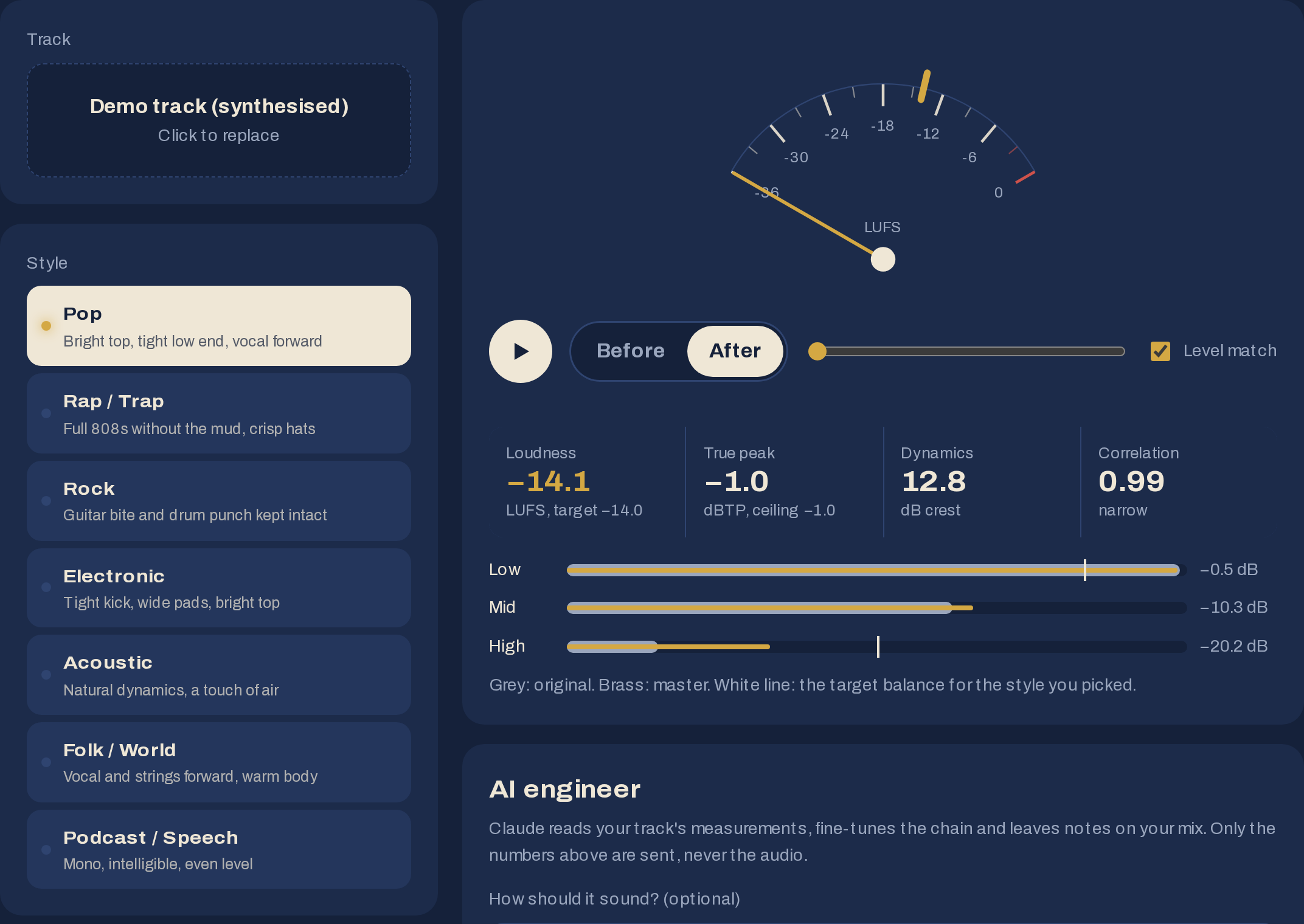
ITU-R BS.1770 integrated loudness, 4× oversampled true peak, band balance and stereo correlation.
Shape
Your style's chain is set from the measurements: EQ, compressor, stereo width, mono bass and limiter.
Compare
Before and after play in sync; switch with one click. Level matching lets you hear only the difference.
Deliver
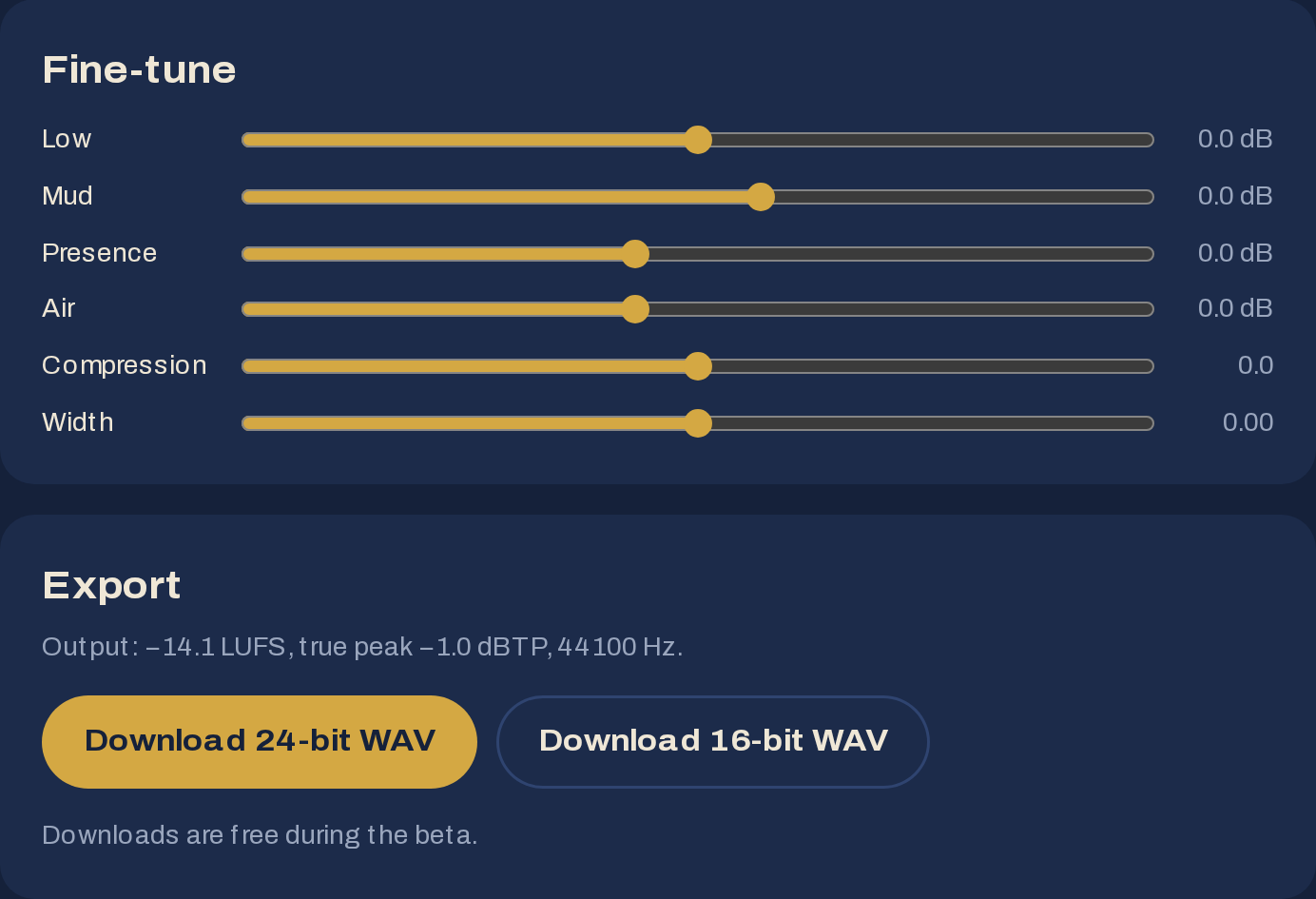
24-bit or dithered 16-bit WAV at the original sample rate. The numbers are on screen before you download.
Inside the studio
Measurement, chain, comparison and export on one screen.
It measures first
As soon as a track loads, it's measured with the methods streaming platforms use. The chain is set up from those measurements.
- ITU-R BS.1770 integrated loudness (LUFS)
- 4× oversampled true peak (dBTP)
- Crest factor and stereo correlation
- Low, mid and high band balance
The demo track, measured before mastering
Then it gets to work
Each style has its own starting point. If the measured band balance is far from the style's target, the chain corrects itself.
- High-pass: clears sub-bass rumble
- EQ: low shelf, mud region (~300 Hz), presence (~3 kHz), air (~10 kHz)
- Stereo: width control, mono bass
- Compressor: soft knee, ratio set by style
- Limiter: target LUFS, −1 dBTP ceiling
Hear the difference
Both versions play in sync and you switch with one click. With level matching on, the master is turned down to the original's loudness, so volume can't fool your ears.
- Gapless switching
- Level-matched comparison
- Band balance before and after, side by side
Release-ready WAV
24-bit or dithered 16-bit WAV at the original sample rate. The output's loudness and true peak are shown before you download.
- True peak below −1 dBTP on every target
- The file is created on your computer, never on a server
Not a preset. Made for your mix.
The AI engineer runs on Claude. It reads your track's measurements and the sound you're after, fine-tunes the chain, and tells you what to fix in the mix itself. Only numbers are sent, never your audio.
Every suggestion shows up on the sliders, so you can keep it, tweak it or undo it.
Request: “bring the vocal forward”
The mix is bass-heavy, the top end is closed and it's nearly mono; we're trimming the bass and opening up the vocal range and the air.- The low band is about 4.7 dB above target and the highs about 10 dB below. The preset closes half of that; I've taken 2 dB off the bass and added 3 dB of air.
- +1.5 dB around 3 kHz for the vocal, and −1 dB in the 300 Hz mud region so it doesn't get boxy as it comes forward.
- Correlation 0.99 means the file is effectively mono, so I left the width alone. For more width, pan instruments in the mix or add a stereo reverb.
- At −29.8 LUFS the mix is very quiet. I've added a little compression so the limiter doesn't work too hard on the way to −14 LUFS.
Example output for the demo track. Notes change with every track's measurements.
Why do home mixes sound flat?
Four of the most common home-studio problems and what Arya does about them. The first two charts use real measurements of the demo track on this page.
Everyone reaches for the volume when your track comes on
Platforms turn loud tracks down, but they don't turn quiet ones up enough. Home mixes often sit below −20 LUFS. Arya brings the track to the target level and keeps peaks below −1 dBTP.
It sounds like it's behind a curtain
When the highs are weak, vocals and hi-hats lose their sparkle. Arya pulls the top end towards the style's target without overdoing it: it closes half the gap and leaves the rest to you.
Plenty of bass, no definition
When 200–400 Hz builds up, bass and vocals blur together. Arya cuts the mud region, opens the low shelf to suit the style and keeps the bass in mono, so it sits the same on a phone and in a club.
Type “the bass is boomy” and the AI engineer tunes these settings for your track.
- Mud region (~300 Hz): −1 to −2.5 dB depending on style
- Low shelf (~110 Hz): set automatically from the measured balance
- Mono bass: everything below 120–150 Hz centred
Every song on the EP sounds like it came from somewhere else
Tracks mastered with the same target and style land at the same loudness. The same goes for beat packs, podcast episodes and DJ sets.
Illustrative example.
Who it's for
Home-studio musicians
The last step before sending a demo, single or EP to your distributor. Home mixes often sit around −20 LUFS while the songs next to them in a playlist sit at −14.
Beatmakers
Bring beat packs and the type beats you upload to YouTube to the same level, with tight, mono low end.
DJs
Level tracks from different sources at the club target (−9 LUFS) so nothing jumps out during a set.
Podcasters and creators
Deliver speech in mono, clear and at −16 LUFS, so levels don't jump between episodes.
No uploads, no queue
Your track is mastered in your own browser. A three-minute song is ready in a few seconds on a typical laptop.
When you use the AI engineer, only the measurements and your request are sent to Claude. Your audio file never is.
Listening is always free
Everything, including downloads, is free during the beta. Planned pricing after the beta:
Per track
- Unlimited previews and A/B
- 24-bit and 16-bit WAV
- All styles and targets
Unlimited
- Unlimited downloads
- AI engineer on every track
- Project history
Prices in GBP. Planned pricing; nothing is charged during the beta.
Let's be honest
Arya doesn't replace a professional mastering engineer. It gives a fast, clean result for demos, singles, beats and podcasts. If you have the budget for an album, work with an engineer, and use Arya as a reference beforehand.
Questions
What does mastering actually do?
It's the last step after mixing: the tone is balanced, the dynamics are tidied up, the stereo image is set and the track is brought to the level streaming platforms expect. The aim is a track that sounds consistent on speakers, headphones and phones.
Is my file uploaded to a server?
No. The audio is opened in your browser, measured and mastered on your computer, and the WAV is created on your computer. If you use the AI engineer, only the measurements (loudness, peak, band balance and so on) and the request you type are sent to Claude.
What does the AI engineer do?
Every style starts from a preset. The AI engineer reads your track's measurements and your request ("bring the vocal forward", say), fine-tunes that preset, and writes short notes on what to fix in the mix itself. You can undo its suggestions in one click or move the sliders yourself.
Does it replace a mastering engineer?
No. An experienced engineer makes artistic decisions and catches problems you might miss. Arya gives a fast, clean result for demos, singles, beats and podcasts. If you have the budget for an important release, work with an engineer.
How should I prepare my mix?
Switch off any limiter on the master bus and keep peaks between −6 and −3 dBFS. A 24-bit WAV is best. Mastering can't rescue an unbalanced mix; it can only polish it.
Which target should I choose?
Spotify, YouTube and Tidal normalise to around −14 LUFS; Apple Music and podcasts sit closer to −16. For DJ sets or live use, the club target (−9 LUFS) gives a louder, denser result. True peak stays below −1 dBTP on every target.
Why level matching?
Louder always sounds better. With level matching on, the master is played back at the original's loudness, so you only hear the difference in tone and dynamics. Your download isn't affected.
Which files can I open, and what do I get?
Any audio file your browser can decode: WAV, MP3, M4A and FLAC (FLAC support in Safari depends on the version). You download a WAV at the original sample rate, 24-bit or dithered 16-bit. Loudness and true peak are shown before you download.
Is it free?
During the beta, everything is free: preview, comparison, the AI engineer and downloads. After the beta, listening and comparing stay free; downloads will be pay-per-track or a monthly plan.
Does it work on my phone?
It works in current mobile browsers. Long tracks can take a few seconds to process; a laptop is more comfortable for regular use.
Mix ready? Master it in a minute.
Try the demo track first, then drop in your own. No sign-up, no uploads.
Arya Labs
Arya Labs is a London-based software startup building browser-based audio tools for independent musicians and creators. It was founded in 2026 by Sercan Çidem. Arya is our first product: a mastering studio that processes audio locally in the browser, with an AI mastering engineer built on the Claude API. We build our software with Claude Code.
Contact: sercan@aryalabs.co